
UI as API: Extracting Data Using Vision Models
When APIs don't expose what you need, vision models offer a stable alternative to brittle scrapers. A complete walkthrough building Jira automation.
TL;DR: How to extract data from any web interface when the API doesn't provide it, using vision models as a stable alternative to brittle HTML scraping. Complete implementation with Playwright, Gemini, and n8n.

I am a Software Engineer turned Product Manager. Because I spent my formative years as an engineer, I am constantly looking for efficiency. My default setting is to automate repetitive workflows so I can free up cognitive cycles for the work that actually matters. I take that same structural, automation-first outlook into my daily PM work.
Part of my role involves sharing critical updates with independent, cross-functional product teams. It's a highly manual process: I need to ensure that every relevant team has seen, acknowledged, and reviewed these changes. We use Jira for tracking these updates, and the most lightweight way for teams to signal their acknowledgment is simply dropping a 👍 reaction on the ticket comment. One-click, low-friction acknowledgment.
But when I tried to build a Jira reactions automation to track these acknowledgments, I hit a wall.
Jira supports these emoji reactions in their UI, but this data isn't exposed through any API endpoint. If you need to programmatically access this information, you're left with limited options, none of them particularly appealing.
This is a common problem across web applications: interfaces display data that APIs don't expose. When you need to extract this information programmatically, you're stuck choosing between waiting indefinitely for vendor support or building HTML scrapers that break with every interface update. What I discovered is that vision models offer a third option: treat the rendered UI itself as your data source and let the model extract what you need.
Here's the pattern I used, which you can apply to any similar problem.
The Problem with Traditional Scraping
Traditional HTML and screen scraping approaches have always been fragile. You target specific CSS classes, DOM structures, or XPath selectors that identify the elements you care about. This works until the next interface update, at which point your selectors no longer match and your scraper breaks. Changes to class names or component structure are common. You end up maintaining code that requires constant attention and fails unpredictably.
The brittleness compounds when you're extracting structured data. Small changes to layout or markup can completely break your extraction logic. Even when the scraping works, the code is difficult to read and maintain because it's tightly coupled to implementation details — details the vendor never promised to keep stable.
Vision Models as Stable Extractors
Vision models bypass the page code entirely. Instead of parsing HTML structure, they interpret the rendered interface exactly as you and I do.
If Jira changes a CSS class from reaction-badge to emoji-indicator, your HTML parser breaks. A vision model continues working because the pixels haven't changed.
The key insight: Visual stability beats structural stability. Interface designers prioritize visual consistency for users, not structural consistency for machines. While implementation details change constantly, the actual appearance and layout of interface elements remains relatively consistent. A thumbs-up emoji next to a user's name looks identical before and after a complete frontend rewrite.
Vision models exploit this visual contract.
Building the Solution
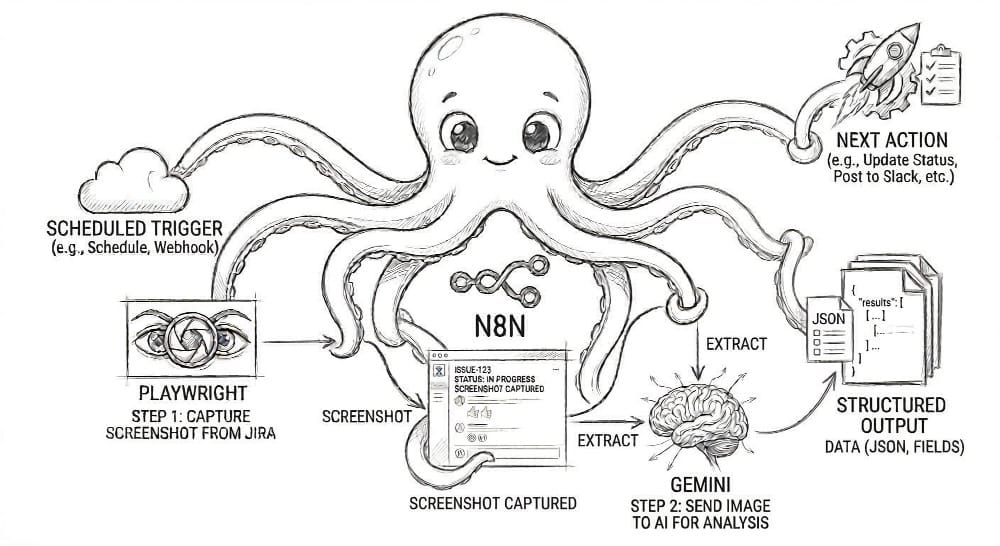
The solution uses three components working in harmony:
Playwright acts as the eyes, navigating a headless Chrome browser to capture pixel-perfect screenshots of the Jira interface. It handles authentication and waits for the page to fully render before capturing.
Gemini's vision model acts as the brain. It receives the screenshot and, guided by a simple prompt, extracts the data into structured JSON. It doesn't know what a <div> or a <span> is. It just sees what a human sees and reports back.
A local n8n instance acts as the nervous system, orchestrating the entire flow. It triggers Playwright, sends the resulting image to Gemini, parses the JSON response, and executes the business logic.
Each component is distinct, modular, and serves a single purpose. This is the key to building a maintainable automation pipeline.
Cost and Reliability
This approach is reliable and remarkably cost-effective. Costs are negligible, a few dollars monthly for processing dozens of tickets, saving 20-30 minutes of manual checking each week.
The reliability has been rock-solid. Over several weeks of use, the extraction accuracy has remained high without any intervention needed. Interface updates that would break traditional scrapers have had no impact. This self-healing automation continues working because it depends on what the interface looks like, not how it's built.
When This Approach Makes Sense
This RPA pattern is a specific tool for a specific class of problem where visual interfaces lack API access. Use it when you see this combination of factors:
✅ A "Visible but Unavailable" Data Source
The information you need is clearly visible in the user interface, but it is not exposed via a supported API. The Jira comment emoji reaction is a perfect example, tracked in ticket JRACLOUD-78153 but still "Under Consideration" as of early 2026 (ticket originally created in 2022).
✅ A Stable Visual Contract
The interface is visually consistent, even if the underlying code is not. The vendor prioritizes a stable visual experience for its human users, which is the contract your vision model depends on.
However, you must also accept the trade-offs:
⚠️ Latency is a Feature, Not a Bug
Vision-based extraction is asynchronous. It involves screenshots, uploads, and model inference. This makes it unsuitable for real-time or high-frequency scenarios where traditional APIs will always win. For many automation workflows, this latency is a perfectly acceptable price for maintainability.
⚠️ Security is Critical
This process runs within your environment, making you the security boundary. Credentials, API keys, and login sessions must be managed securely. Screenshots should be treated as sensitive data, and the capture area must be scoped to the absolute minimum necessary to prevent exposing unrelated information.
Setting Up the Pipeline
Before building the workflow, you need a local n8n instance, the Playwright community node, and credentials for both Gemini and Jira.
Groundwork: Prerequisites
Before building the workflow, you need a local n8n instance, the Playwright community node, and credentials for both Gemini and Jira.
- Get n8n Running Locally: Install n8n via npm (
npm install n8n -g) and runn8n start. Access the interface athttp://localhost:5678. (n8n installation documentation) - Install the Playwright Community Node: Inside the n8n interface, go to Settings > Community Nodes. Search for and install
n8n-nodes-playwright(requires approximately 1GB of disk space for browser binaries). Restart n8n after installation. (n8n community nodes documentation) - Configure Gemini Credentials: Generate an API key from Google AI Studio. In n8n, go to Settings > Credentials, create a new "Google Gemini API" credential, and paste in your key. (Gemini API quickstart | n8n Google Gemini credentials)
- Set up Jira Authentication: In the same Credentials screen, create and test a new Jira credential using your instance URL and an API token. (n8n Jira node documentation)
Building the Workflow
The workflow follows four logical stages: Fetch, Capture, Extract, and Act.
1. Fetch: Getting the Target Ticket
The workflow kicks off with a Schedule Trigger set to run every Thursday morning. The trigger feeds into a Jira Node configured with a JQL query to find all the relevant tickets that need review. The key output from this node is the ticket URL.
References: Schedule Trigger node | Jira node
2. Capture: Screenshotting the Comments
The ticket URL flows into the Playwright Node. The node navigates to the URL, handles the login, waits for the page to render fully, and captures a clean screenshot. If you want to capture only a specific section of the page, you can define a CSS selector.
Reference: Playwright community node
3. Extract: Turning Pixels into Structured Data
The image data is piped into the Google Gemini Node. The prompt is the most critical piece of configuration:
Prompt: "Review this Jira comment section screenshot. Identify which team-specific comments have NOT received any responses. For each unresponded comment, extract the team name and the people tagged in that comment. Return the results as a JSON array where each object contains team and members fields. Return ONLY valid JSON, with no markdown formatting or any additional text. If all comments have responses, return an empty array: []"
I set the model (Gemini 2.5 Flash for cost-effectiveness or Gemini 3.1 Pro for higher accuracy) and its "temperature" to a low value (like 0.2) to ensure consistent, structured output. The model's response is text, which is then passed to a Code Node that strips any markdown formatting and parses the clean text into a usable JSON object.
Reference: Google Gemini node
4. Act & Notify: Closing the Loop
Now that I have a clean list of who hasn't acknowledged the ticket, a Jira, Slack, or Email Node sends the message to the appropriate channel, tagging the specific people who still need to review the ticket.
5. Error Handling: Planning for Failure
n8n has a built-in "Error Workflow" feature. I've configured this to trigger on any failure, log the error details for debugging, and send an alert for any persistent issues that require manual intervention.
Reference: n8n error handling
Testing and Going Live
Before running the automation in production, I validated the vision model's accuracy using test tickets with edge cases like no comments, multiple unresponded comments, different emoji types. I manually compared the JSON output to what appeared on screen, refining the prompt until results were consistently accurate.
Once live, the workflow has run reliably for weeks with no adjustments needed. I monitor execution logs in n8n and occasionally check API usage in Google Cloud.
A Pattern Worth Considering
This AI browser automation pattern, treating the UI as the API, is a pragmatic third way between waiting for official API support and maintaining scrapers that break with every update.
This technique is a direct answer to a class of problems that have always been awkward to solve: the data is visible on the screen, but the endpoint is missing. As vision models continue to get faster, cheaper, and more accurate, this pattern will become a standard part of the modern automation toolkit.
The broader lesson is not about scraping; it's about working with constraints.
When the front door (the API) is locked and the back door (the DOM) is a fragile, ever-changing mess, vision models let you walk in through the front window.
Often, the solution isn't a new tool. It's using what you have in a way nobody thought to try.